Back to Home


Artificial Intelligence in MyChart
Reimagining the Patient Experience wit hAI
Epic set out to make MyChart more approachable—using generative AI to turn overwhelming patient information into concise, actionable summaries.
The resulting design system now underpins all AI interactions in MyChart, streamlining patient workflows and establishing new trust patterns for healthcare AI.
See Final Designs

See Its Impact in the Healthcare Industry
Patient Outcomes
87%
High Usability
Early feedback showed 87% of participants rated MyChart AI features as easy or very easy to use and 82% reported being satisfied or very satisfied with AI summary explanations.
+41
Positive Net Promoter Score (NPS)
AI feedback achieved a score of +41, with most patients classified as promoters. Early pilot results suggest AI explanations in MyChart can significantly improve comprehension of lab results, reduce patient anxiety, increase satisfaction, and show strong patient receptivity.
My Role
Lead designer for the AI Design System
2023 - Present
Collaboration
Partnered with product leads, engineers, and designers across MyChart and the Patient Experience division.
Scope
Defined mental models, AI interfaces, and trust-building mechanisms, starting with clinical summaries.
Context & Problem
Keep Patients in MyChart
Research Details

With AI still new in healthcare, I set out to define the patient mental model and expectations for its use. I researched by:
Co-designing with Patients
Patients expected AI to look distinct from the rest of the application, citing trust in healthcare information as a key factor. They also expected something simple and easy to do, and shared that when MyChart lacked clarity, they often turned to online searches for answers.
Ensuring Healthcare Compliance
I worked with our legal and regulatory team to address privacy, accuracy, and transparency requirements.
This research shaped what I defined as the patient mental model:
It reframes the experience from self-synthesizing data to clicking once for a generated summary.

When test results and care details feel complex or unclear, patients often turn to provider messages, phone calls, or third-party sources just to interpret what their records mean. This creates unnecessary friction for patients, increases support burden on healthcare organizations, and undermines the very purpose of patient portals like MyChart—to provide clear, accessible, and trustworthy information directly at the point of need.
The Goal
I set out to create AI guidelines and a design system that allows patients to understand their healthcare within MyChart and provides meaningful transparency as to how AI makes conclusions from patient health questions.
Key Use Cases
Summaries of complex health information, such as:
- Test Results
- Billing Questions
AI Design Challenges
Designing the patterns meant tackling key questions on building patient trust in a new, error-prone technology.
Trust Factors
Without clear boundaries, patients risked mistaking AI summaries for provider-written content.
Workflow Integration
AI needed to slot into existing MyChart activities without disrupting patient familiarity,
Model Limitations
Disclaimers should clarify that AI-generated information is not a singular truth and not medical advice.
What I Designed
AI Experiences in MyChart
Key Considerations
Branding
The MyChart AI Icon leaned on several of MyChart’s core principles as a software, focusing on an identity that represents collaboration and joy. The colors also align with AI design patterns in Epic’s clinician-facing software, ensuring consistency across the company.
Icon
Early Iterations

Epic Brand Unification
The MyChart AI Icon leaned on several of MyChart’s core principles as a software, focusing on an identity that represents collaboration and joy. The colors also align with AI design patterns in Epic’s clinician-facing software, ensuring consistency across the company.
Hyperspace AI Bloom to MyChart AI Heart

Context of the Chart
Patients who turn to other AI assistants lose meaningful context because the assistant isn’t aware of the patient health record. My goal was to ensure that AI-generated content was context aware and could accurately point to previous notes and visits left by patient’s care teams.
Trust & Transparency
Usability and Desirability tests showed that patients needed very clear indicators that something was AI. Earlier iterations lacked the transparency of AI and testing showed mixed results—while participants sensed the AI cards were different, many couldn’t clearly identify them as AI.
In particular, one participant, after telling them that they were interacting with an AI feature, said:
“Oh, you just straight up lied to me. You’re saying that this was AI the whole time?”
Participants could not distinguish this as an explicit AI card

Company Wide Principles
To ensure AI features met both company standards and the unique demands of healthcare, we built on Epic’s company-wide AI principles while defining a patient experience–specific subset. This layered approach allowed us to keep our designs consistent across the organization while addressing the stricter compliance, safety, and reliability needs of patient-facing experiences.
Epic AI Design Principles
Efficiency
Transparency
Trust
Epic-Wide AI Principles
Safe
Accurate
Ethical
Patient Experience AI Principles
For NDA purposes, I’m unable to show the AI interface in the context of MyChart.
I created a design system and framework that balances clear AI identification, trust, and MyChart brand consistency, and established principles for scalable AI beyond the UI.
Brand
AI distinct color, “make it pop”



Summary Content
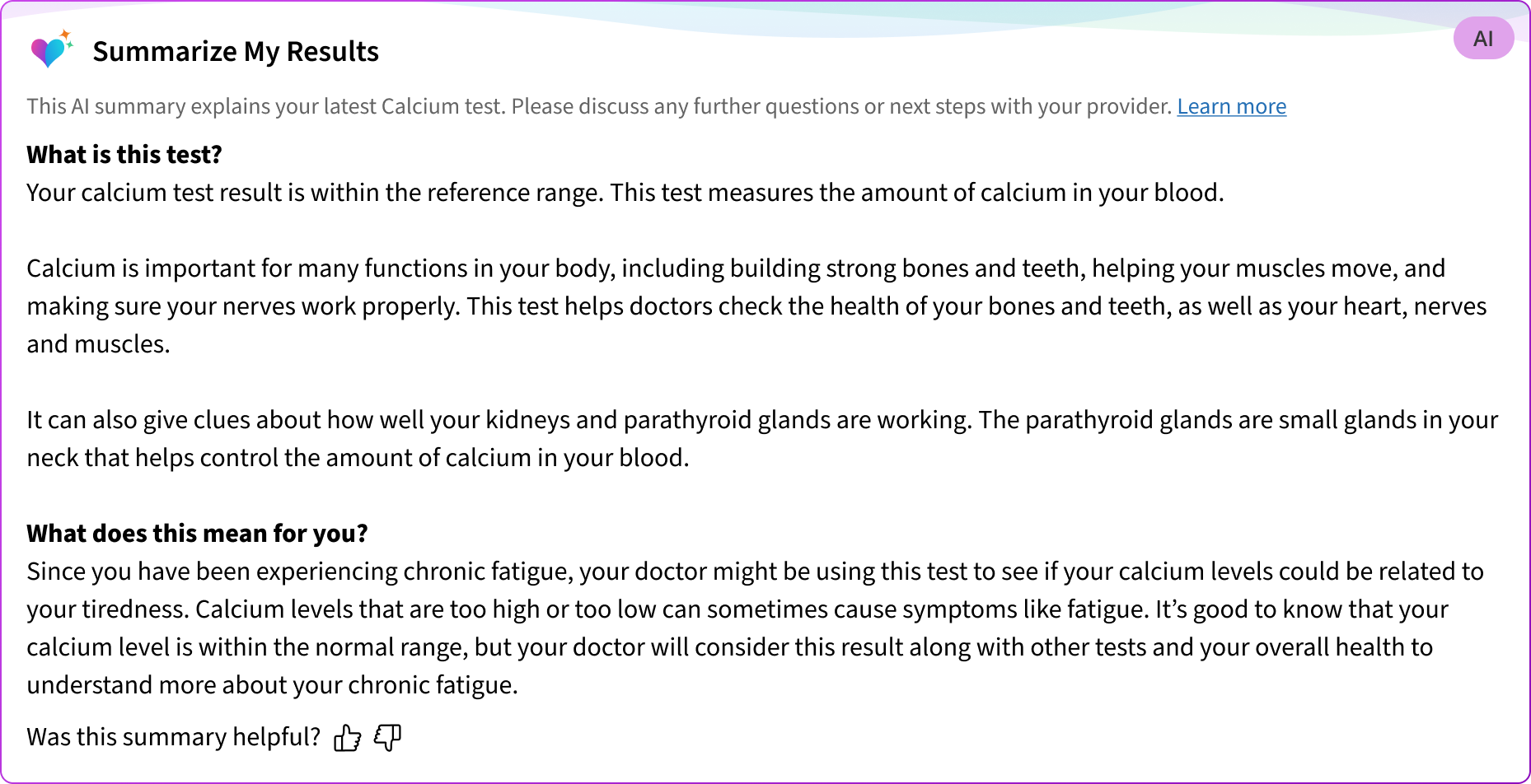
Explanation of the result along with context of the patient’s chart

Generate summary
AI
Transparency & Feedback
Clear indicators of AI and expectations through indicators and disclaimers
This AI summary explains your latest Calcium test. Please discuss any further questions or next steps with your provider. Learn more
Was this summary helpful?


Impact & Future
Emmie
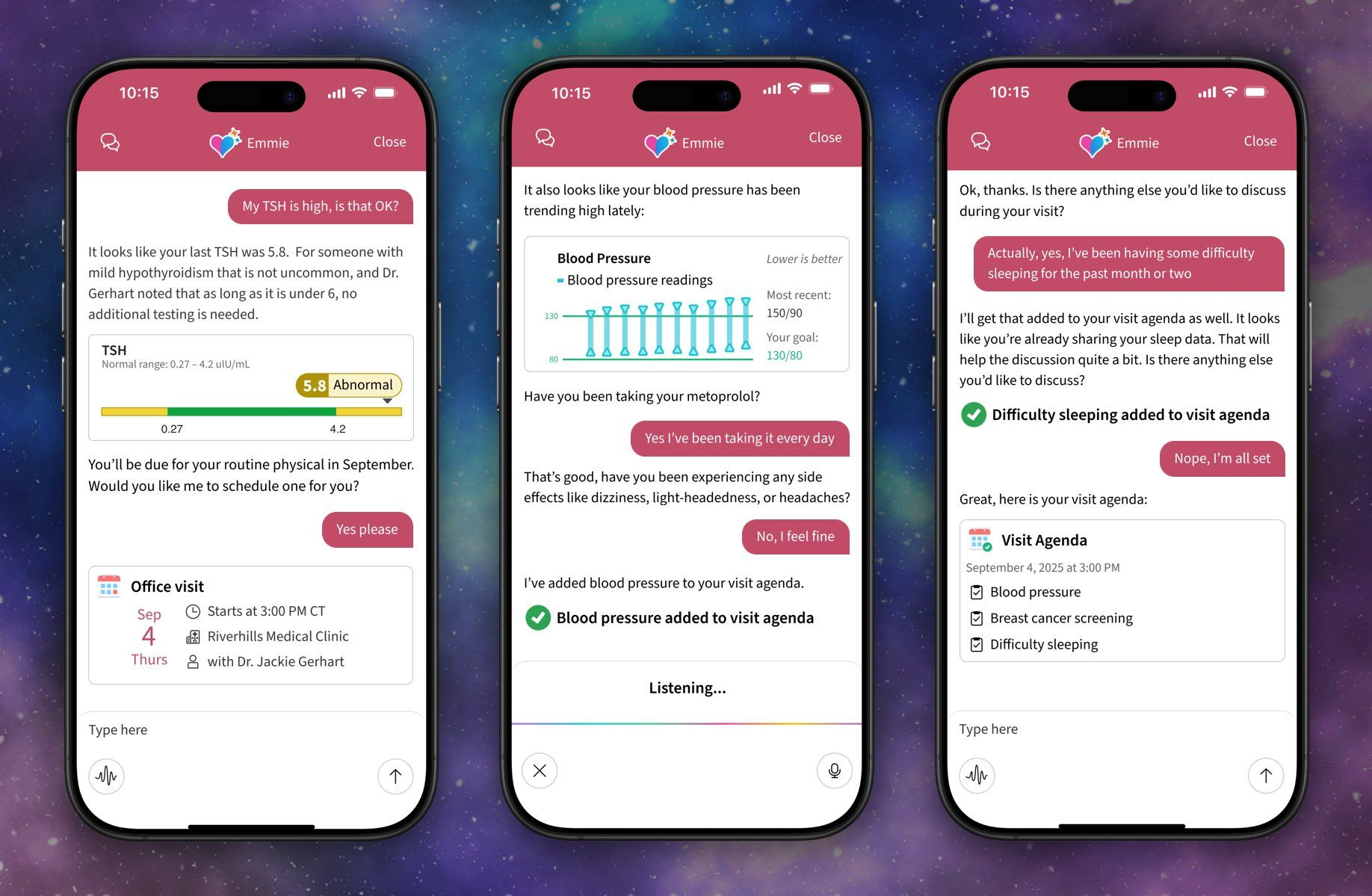
While designing this experience, we’ve been noticing that patients want to dive further into their healthcare. Alongside this design system, I’m currently designing Emmie, MyChart’s AI assistant.
Key Use Cases
I’m designing Emmie to become a platform to solve a lot of patient healthcare related problems in the future. Some of the problems the patient experience team is tackling with Emmie today are:
- Pre-Visit assistance
- Clinical note summarizations
- Healthcare guidance
Headlines
Our early version of Emmie is already making a huge impact on the healthcare industry:
Forbes
Electronic Health Record Giant Epic Rolling Out New AI Tools

Rush University Health
MyChart’s AI billing assistant is helping Rush see a 50% reduction in billing customer service messages
Back to Home


Artificial Intelligence in MyChart
Reimagining the Patient Experience wit hAI
Epic set out to make MyChart more approachable—using generative AI to turn overwhelming patient information into concise, actionable summaries.
The resulting design system now underpins all AI interactions in MyChart, streamlining patient workflows and establishing new trust patterns for healthcare AI.
See Final Designs
See Its Impact in the Healthcare Industry
Patient Outcomes
87%
High Usability
Early feedback showed 87% of participants rated MyChart AI features as easy or very easy to use and 82% reported being satisfied or very satisfied with AI summary explanations.
+41
Positive Net Promoter Score (NPS)
AI feedback achieved a score of +41, with most patients classified as promoters. Early pilot results suggest AI explanations in MyChart can significantly improve comprehension of lab results, reduce patient anxiety, increase satisfaction, and show strong patient receptivity.
My Role
Lead designer for the AI Design System
2023 - Present
Collaboration
Partnered with product leads, engineers, and designers across MyChart and the Patient Experience division.
Scope
Defined mental models, AI interfaces, and trust-building mechanisms, starting with clinical summaries.
Context & Problem
Keep Patients in MyChart
Research Details
With AI still new in healthcare, I set out to define the patient mental model and expectations for its use. I researched by:
Co-designing with Patients
Patients expected AI to look distinct from the rest of the application, citing trust in healthcare information as a key factor. They also expected something simple and easy to do, and shared that when MyChart lacked clarity, they often turned to online searches for answers.
Ensuring Healthcare Compliance
I worked with our legal and regulatory team to address privacy, accuracy, and transparency requirements.
Evaluating Current Patient workflows and How AI Projects Are Changing Them
Current MyChart Flow
Test Results

Test Result Details
Parse information

Contact Help

Patients:

more wait
more anxiety
more complexity
Orgs:
more calls
more messages
more time
Proposed AI Flow
Test Results
Test Result Details

Generate Summary
Actionable steps
This research shaped what I defined as the patient mental model:
It reframes the experience from self-synthesizing data to clicking once for a generated summary.
When test results and care details feel complex or unclear, patients often turn to provider messages, phone calls, or third-party sources just to interpret what their records mean. This creates unnecessary friction for patients, increases support burden on healthcare organizations, and undermines the very purpose of patient portals like MyChart—to provide clear, accessible, and trustworthy information directly at the point of need.
The Goal
I set out to create AI guidelines and a design system that allows patients to understand their healthcare within MyChart and provides meaningful transparency as to how AI makes conclusions from patient health questions.
Key Use Cases
Summaries of complex health information, such as:
- Test Results
- Billing Questions
AI Design Challenges
Designing the patterns meant tackling key questions on building patient trust in a new, error-prone technology.
Trust Factors
Without clear boundaries, patients risked mistaking AI summaries for provider-written content.
Workflow Integration
AI needed to slot into existing MyChart activities without disrupting patient familiarity,
Model Limitations
Disclaimers should clarify that AI-generated information is not a singular truth and not medical advice.
What I Designed
AI Experiences in MyChart
Key Considerations
Branding
The MyChart AI Icon leaned on several of MyChart’s core principles as a software, focusing on an identity that represents collaboration and joy. The colors also align with AI design patterns in Epic’s clinician-facing software, ensuring consistency across the company.
Icon
MyChart and Epic Principles
Patient at the Heart
DUET, Difficult for Us (Epic), Easy for Them (Patients & Healthcare Orgs)
Understandable By All
Consistent Experience
Joy to Use
Early Iterations

Epic Brand Unification
The MyChart AI Icon leaned on several of MyChart’s core principles as a software, focusing on an identity that represents collaboration and joy. The colors also align with AI design patterns in Epic’s clinician-facing software, ensuring consistency across the company.
Hyperspace AI Bloom to MyChart AI Heart
Context of the Chart
Patients who turn to other AI assistants lose meaningful context because the assistant isn’t aware of the patient health record. My goal was to ensure that AI-generated content was context aware and could accurately point to previous notes and visits left by patient’s care teams.
Trust & Transparency
Usability and Desirability tests showed that patients needed very clear indicators that something was AI. Earlier iterations lacked the transparency of AI and testing showed mixed results—while participants sensed the AI cards were different, many couldn’t clearly identify them as AI.
In particular, one participant, after telling them that they were interacting with an AI feature, said:
“Oh, you just straight up lied to me. You’re saying that this was AI the whole time?”
Participants could not distinguish this as an explicit AI card

Company Wide Principles
To ensure AI features met both company standards and the unique demands of healthcare, we built on Epic’s company-wide AI principles while defining a patient experience–specific subset. This layered approach allowed us to keep our designs consistent across the organization while addressing the stricter compliance, safety, and reliability needs of patient-facing experiences.
Epic AI Design Principles
Efficiency
Transparency
Trust
Epic-Wide AI Principles
Safe
Accurate
Ethical
Patient Experience AI Principles
For NDA purposes, I’m unable to show the AI interface in the context of MyChart.
I created a design system and framework that balances clear AI identification, trust, and MyChart brand consistency, and established principles for scalable AI beyond the UI.
Brand
AI distinct color, “make it pop”


Summary Content
Explanation of the result along with context of the patient’s chart
Generate summary
AI
Transparency & Feedback
Clear indicators of AI and expectations through indicators and disclaimers
This AI summary explains your latest Calcium test. Please discuss any further questions or next steps with your provider. Learn more
Was this summary helpful?
Impact & Future
Emmie
While designing this experience, we’ve been noticing that patients want to dive further into their healthcare. Alongside this design system, I’m currently designing Emmie, MyChart’s AI assistant.
Key Use Cases
I’m designing Emmie to become a platform to solve a lot of patient healthcare related problems in the future. Some of the problems the patient experience team is tackling with Emmie today are:
- Pre-Visit assistance
- Clinical note summarizations
- Healthcare guidance
Headlines
Our early version of Emmie is already making a huge impact on the healthcare industry:
Forbes
Electronic Health Record Giant Epic Rolling Out New AI Tools
Rush University Health
MyChart’s AI billing assistant is helping Rush see a 50% reduction in billing customer service messages
Back to Home

Artificial Intelligence in MyChart
Reimagining the Patient Experience wit hAI
Epic set out to make MyChart more approachable—using generative AI to turn overwhelming patient information into concise, actionable summaries.
The resulting design system now underpins all AI interactions in MyChart, streamlining patient workflows and establishing new trust patterns for healthcare AI.
See Final Designs
See Its Impact in the Healthcare Industry
Patient Outcomes
87%
High Usability
Early feedback showed 87% of participants rated MyChart AI features as easy or very easy to use and 82% reported being satisfied or very satisfied with AI summary explanations.
+41
Positive Net Promoter Score (NPS)
AI feedback achieved a score of +41, with most patients classified as promoters. Early pilot results suggest AI explanations in MyChart can significantly improve comprehension of lab results, reduce patient anxiety, increase satisfaction, and show strong patient receptivity.
My Role
Lead designer for the AI Design System
2023 - Present
Collaboration
Partnered with product leads, engineers, and designers across MyChart and the Patient Experience division.
Scope
Defined mental models, AI interfaces, and trust-building mechanisms, starting with clinical summaries.
Context & Problem
Keep Patients in MyChart
Research Details
With AI still new in healthcare, I set out to define the patient mental model and expectations for its use. I researched by:
Co-designing with Patients
Patients expected AI to look distinct from the rest of the application, citing trust in healthcare information as a key factor. They also expected something simple and easy to do, and shared that when MyChart lacked clarity, they often turned to online searches for answers.
Ensuring Healthcare Compliance
I worked with our legal and regulatory team to address privacy, accuracy, and transparency requirements.
Evaluating Current Patient workflows and How AI Projects Are Changing Them
Current MyChart Flow
Test Results
Test Result Details
Parse information
Contact Help
Patients:
more wait
more anxiety
more complexity
Orgs:
more calls
more messages
more time
Proposed AI Flow
Test Results
Test Result Details
Generate Summary
Actionable steps
This research shaped what I defined as the patient mental model:
It reframes the experience from self-synthesizing data to clicking once for a generated summary.
When test results and care details feel complex or unclear, patients often turn to provider messages, phone calls, or third-party sources just to interpret what their records mean. This creates unnecessary friction for patients, increases support burden on healthcare organizations, and undermines the very purpose of patient portals like MyChart—to provide clear, accessible, and trustworthy information directly at the point of need.
The Goal
I set out to create AI guidelines and a design system that allows patients to understand their healthcare within MyChart and provides meaningful transparency as to how AI makes conclusions from patient health questions.
Key Use Cases
Summaries of complex health information, such as:
- Test Results
- Billing Questions
AI Design Challenges
Designing the patterns meant tackling key questions on building patient trust in a new, error-prone technology.
Trust Factors
Without clear boundaries, patients risked mistaking AI summaries for provider-written content.
Workflow Integration
AI needed to slot into existing MyChart activities without disrupting patient familiarity,
Model Limitations
Disclaimers should clarify that AI-generated information is not a singular truth and not medical advice.
What I Designed
AI Experiences in MyChart
Key Considerations
Branding
The MyChart AI Icon leaned on several of MyChart’s core principles as a software, focusing on an identity that represents collaboration and joy. The colors also align with AI design patterns in Epic’s clinician-facing software, ensuring consistency across the company.
Icon
MyChart and Epic Principles
Patient at the Heart
DUET, Difficult for Us (Epic), Easy for Them (Patients & Healthcare Orgs)
Understandable By All
Consistent Experience
Joy to Use
Early Iterations
Epic Brand Unification
The MyChart AI Icon leaned on several of MyChart’s core principles as a software, focusing on an identity that represents collaboration and joy. The colors also align with AI design patterns in Epic’s clinician-facing software, ensuring consistency across the company.
Hyperspace AI Bloom to MyChart AI Heart
Context of the Chart
Patients who turn to other AI assistants lose meaningful context because the assistant isn’t aware of the patient health record. My goal was to ensure that AI-generated content was context aware and could accurately point to previous notes and visits left by patient’s care teams.
Trust & Transparency
Usability and Desirability tests showed that patients needed very clear indicators that something was AI. Earlier iterations lacked the transparency of AI and testing showed mixed results—while participants sensed the AI cards were different, many couldn’t clearly identify them as AI.
In particular, one participant, after telling them that they were interacting with an AI feature, said:
“Oh, you just straight up lied to me. You’re saying that this was AI the whole time?”
Participants could not distinguish this as an explicit AI card
Company Wide Principles
To ensure AI features met both company standards and the unique demands of healthcare, we built on Epic’s company-wide AI principles while defining a patient experience–specific subset. This layered approach allowed us to keep our designs consistent across the organization while addressing the stricter compliance, safety, and reliability needs of patient-facing experiences.
Epic AI Design Principles
Efficiency
Transparency
Trust
Epic-Wide AI Principles
Safe
Accurate
Ethical
Patient Experience AI Principles
For NDA purposes, I’m unable to show the AI interface in the context of MyChart.
I created a design system and framework that balances clear AI identification, trust, and MyChart brand consistency, and established principles for scalable AI beyond the UI.
Brand
AI distinct color, “make it pop”
Summary Content
Explanation of the result along with context of the patient’s chart
Generate summary
AI
Transparency & Feedback
Clear indicators of AI and expectations through indicators and disclaimers
This AI summary explains your latest Calcium test. Please discuss any further questions or next steps with your provider. Learn more
Was this summary helpful?

Impact & Future
Emmie
While designing this experience, we’ve been noticing that patients want to dive further into their healthcare. Alongside this design system, I’m currently designing Emmie, MyChart’s AI assistant.
Key Use Cases
I’m designing Emmie to become a platform to solve a lot of patient healthcare related problems in the future. Some of the problems the patient experience team is tackling with Emmie today are:
- Pre-Visit assistance
- Clinical note summarizations
- Healthcare guidance
Headlines
Our early version of Emmie is already making a huge impact on the healthcare industry:
Forbes
Electronic Health Record Giant Epic Rolling Out New AI Tools
Rush University Health
MyChart’s AI billing assistant is helping Rush see a 50% reduction in billing customer service messages